Welcome to Clubhouse Edina
Three things to do in your first week, and where everything else lives.
clubhouseedina.com/members/start-here/ · the online version is always the most current
Start with these three
Do them in order. Each one has its own short guide if you want the screen by screen version.
Get the app and sign in
You will get an invite email from us. Download the app, sign in with the email address the invite was sent to, and set your own password.
Add your card
Card details do not carry over from our previous system, so everyone adds a card once in the app. Please do it before November 5, when the first invoices go out. Prefer to pay by bank transfer? Email us and we will send you the form.
Book your first space
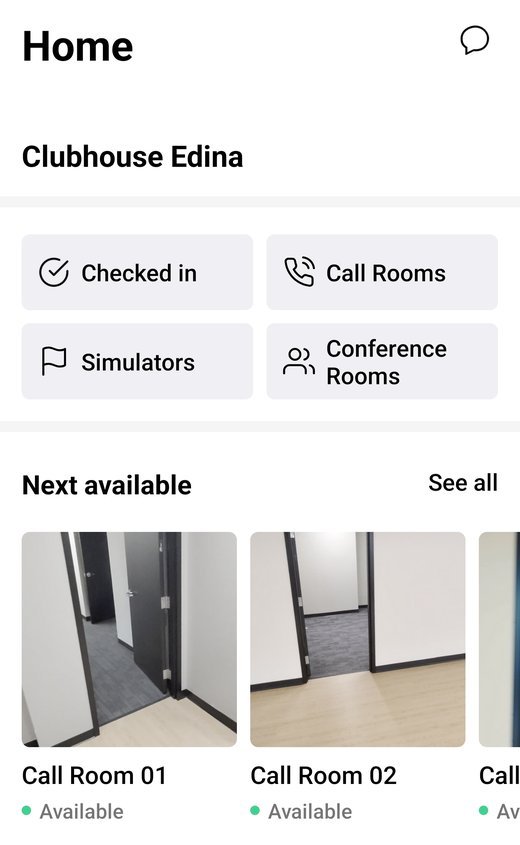
Conference rooms, call rooms and the Trackman bays all book the same way, right from your phone.
What the app is for
The app is your member account. There is no separate website login, so everything below lives in the app.
Rooms and bays
See what is open, book it, and change or cancel it yourself.
Invoices and your card
Your invoices, your payment method, and your plan, including any conference hours that come with it.
Events and members
What is on at the club and who else is here.
Contact Admin
Send us a message from the menu and the reply comes back in the app.
Our app is Clubhouse Edina Members, free on the App Store and Google Play. Sign in with the email address your welcome email came to.
If you have been using the Optix app, it is the same login and everything carries over, so you can delete it once you are in. The older Clubhouse Edina app from our previous system is retired, so delete that one too.
The rest of your first week
- Turn on notifications so booking reminders and club news reach you.
- Get on the Wi-Fi. Ask at reception for the network name and password.
- Get your fob. The elevators open straight into the club. Members with a fob go straight in. No fob yet? Check in at reception and we will get you sorted.
- Try the simulators. The Trackman guide gets you from a dark bay to your first shot.
- Read the house rules. Hours, guests and who to ask are on one page.
Finding us
| Address | 6550 York Avenue South, Suite 600, Edina, Minnesota |
|---|---|
| Getting up | Take the elevator to the sixth floor. The doors open straight into the club in Suite 600. |
| Getting in | Members with a fob go straight in. Anyone without a fob checks in at reception. |
| Parking | Members and guests park in the lot. Members with dedicated parking use the ramp. |
| Questions | Email info@clubhouseedina.com or use Contact Admin in the app. |
Message us in the app with Contact Admin, email info@clubhouseedina.com, or find us at the club. We will sort it out.
This guide was prepared for Clubhouse Edina by Dragan Holdings. Screens in the app can change, so if something here does not match what you see, let us know and we will update it.